Section A - The Prototype: High-Fidelity Screens
A high-fidelity interactive prototype of the Apple Books Book Clubs feature, built using Claude Code. The prototype demonstrates 5 key screens of the feature, designed to match Apple Books' native UI language - SF Pro fonts, Apple's grey/blue palette, pill-shaped buttons, and bottom tab navigation.
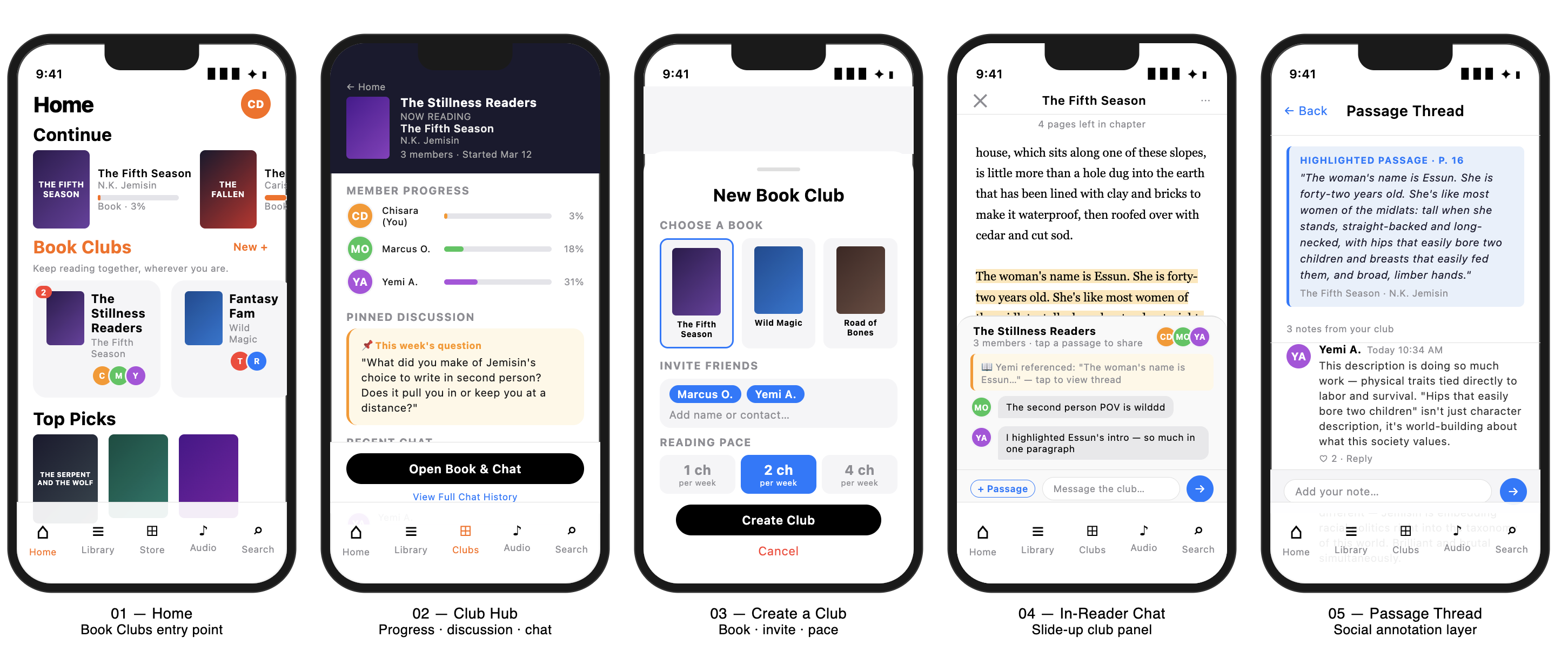
Home (Modified)
Existing Home tab with new "Book Clubs" section between Continue and Top Picks
Book Club Hub
Club detail showing reading progress bars, pinned discussion question, recent chat
Create a Club
Book selector, iMessage-style invite bubbles, reading pace picker
In-Reader Chat Panel
Reader view with slide-up chat drawer anchored to current passage
Passage Thread View
Social annotation thread anchored to a highlighted excerpt
Section B - How I Built It: Prototype Process Document
This document captures the product thinking behind the prototype - including the prompt engineering approach, the feature rationale, and the conversation with Claude that shaped the 5 screens.
The Feature Selected: iMessage Book Clubs (Feature 03)
"When I want to read a book together with friends or family who are spread across different locations, I want to create a shared reading room directly inside iBooks, so I can enjoy the social experience of a book club without coordinating schedules or switching between multiple apps."
Why This Feature?
This was the natural choice from the JTBD stories because it directly addresses one of the three core opportunities identified in the Opportunity Solution Tree: reading feels passive and isolating with no community layer. The iMessage Book Clubs feature directly tackles this by turning a solitary habit into a shared one - without asking users to leave the Apple ecosystem.
The 5 Screens - Design Rationale
The screen selection was guided by a simple question: what is the shortest path that shows the full user journey? The answer: entry point (Home), social hub (Club Hub), onboarding (Create a Club), core interaction (In-Reader Chat), and the deepest engagement moment (Passage Thread). Together, these five screens tell the complete story of the feature.
Tools Used
Prototype built using Claude Code (Anthropic) as a working HTML/CSS prototype. Input: screenshots of the existing Apple Books interface + job stories + PRD. Output: single-file interactive prototype navigable between all 5 screens.
Assignment requirements met: High-fidelity prototype. 5+ distinct screenshots. Tool documented.